0%
Made in India · for schools worldwide

MySchoolOS™: The Complete School ERP Software, Made in India for Schools Worldwide

One platform for admissions, fees, attendance, exams, transport, staff and parent communication, with an AI Assistant that answers your questions and a Risk Center that warns you early.

Page last updated . New features are added regularly.

  • Multi-campus
  • Voice and text AI
  • Online fees
  • Installable app
21Module areas in one platform
170+Features across the platform
6Role-based portals
4Online payment gateways supported
Product tour

See MySchoolOS™ at Work

Real screens from a live MySchoolOS™ school. Names, contact details and school identity are hidden.
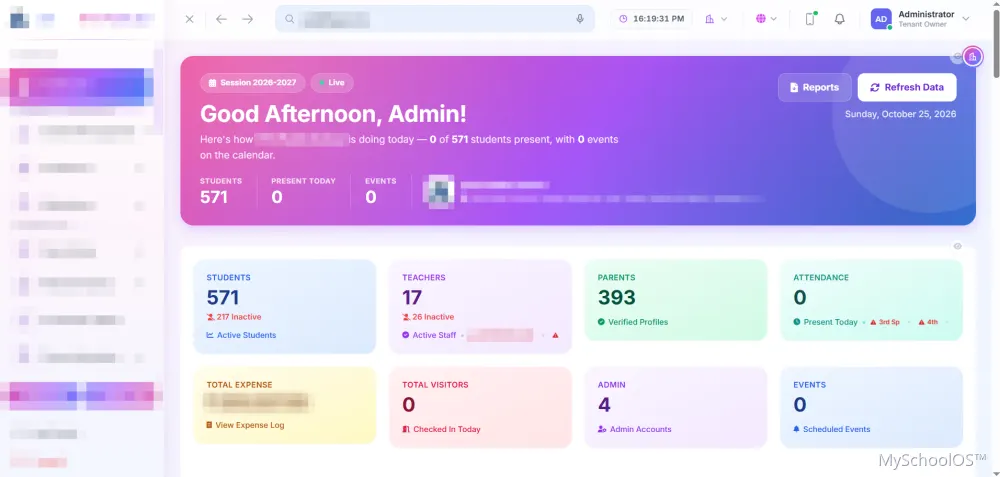
Dashboard
MySchoolOS Dashboard screen

Dashboard. Students, teachers, parents, attendance, expenses and visitors at a glance, with quick access to reports and a live data refresh.
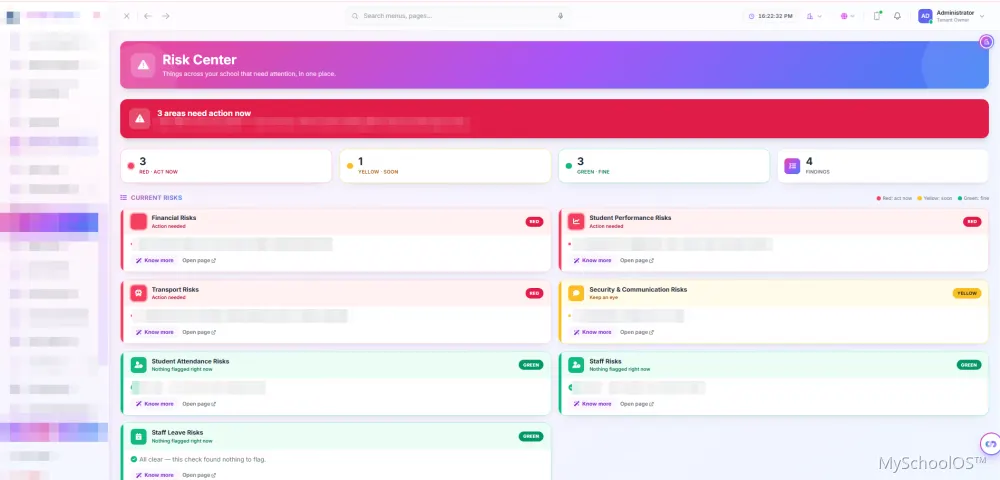
Risk Center
MySchoolOS Risk Center screen

Risk Center. A traffic-light early-warning view for finance, performance, transport and complaints, with a short Risk Brief on each.
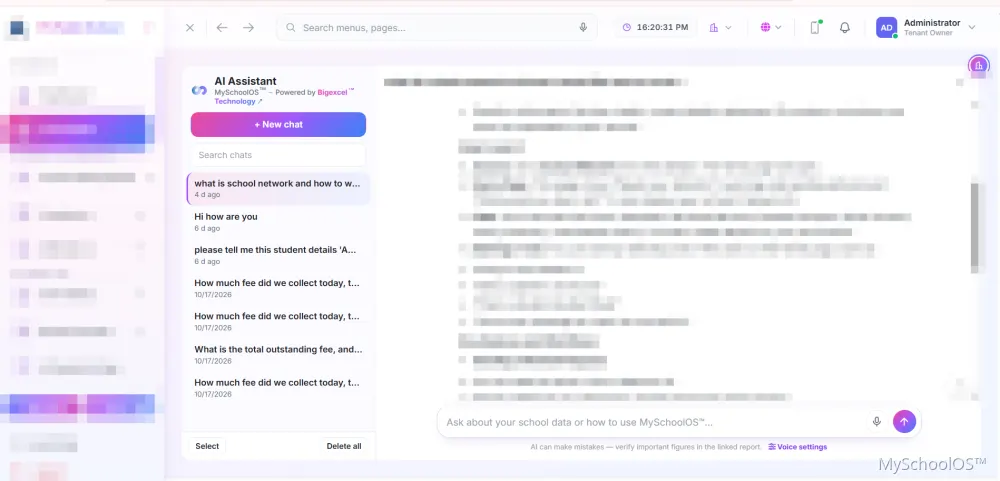
AI Assistant
MySchoolOS AI Assistant screen

AI Assistant. Ask in plain language or by voice, keep a searchable chat history and let the assistant guide your team through any task.

What is MySchoolOS™?

One school operating system, not ten disconnected tools

MySchoolOS™ is a complete cloud school ERP, made in India for schools across the nation and around the world. It runs admissions, fees, attendance, exams, transport, staff payroll, gate security and parent communication in one platform, for one campus or many, with an AI Assistant and a Risk Center that warns you before problems grow.

Built for
Schools of every size, in India and around the world, from one campus to many
Users
Owners, principals, accountants, teachers, gatemen, transport managers and parents
Payments
Razorpay, PayU, Cashfree and Stripe
Security
Two-step login, role permissions, audit trails

Schools use it to move admissions, student records, attendance, exams, fees, staff, transport, gate security and parent communication out of registers and spreadsheets and into one system, with every role seeing only what it needs.

Built for

  • Single-campus schools replacing registers and spreadsheets
  • Multi-campus school groups needing consolidated reports
  • Schools that want online fee payment and parent communication
  • Institutions that want gate, visitor and transport control in the same system
Why MySchoolOS™

Why Schools Choose MySchoolOS™

Ask your school anything

The AI Assistant answers questions on fees, attendance, marks, staff and transport in seconds.

See problems before they grow

The Risk Center flags unpaid fees, falling attendance and expiring bus documents.

Collect fees faster

Online payment, payment links, reminders and follow-up notes in one place.

Run many campuses from one login

Compare campuses side by side while each campus keeps its own data.

Know where every bus is

Live tracking from the driver's phone, with no extra hardware.

Certificates people can trust

QR-verified certificates that anyone can check online.

Artificial Intelligence

Just ask. By typing or by voice.

The MySchoolOS™ AI assistant works from your own school’s data. Ask one question in plain language (a student’s full picture, this month’s fee dues, who topped Class 10, today’s gate activity) and get the answer without opening ten screens. It can also guide staff through any task inside MySchoolOS™.

  • AI AssistantAsk questions in plain language about fees, attendance, marks, toppers, staff, payroll, transport, gate activity and campus comparison. It respects each user's permissions and campus access.
  • AI Actions with ConfirmationThe assistant only proposes a change. A person reviews and confirms before anything is saved, and it is recorded.
  • How-to GuidanceThe assistant explains how to do tasks inside MySchoolOS™, step by step.
  • AI Question Paper GeneratorGenerate question papers by class, subject and difficulty, edit them, and download as PDF or Word. Full history is kept.
  • Student InsightAn AI-written performance report on a student's profile.
  • Owner ControlsThe owner decides who can use the assistant.
  • Voice controlSpeak your question or command instead of typing, handy at the front desk or on the move.
MySchoolOS™ AI Assistant
MySchoolOS AI Assistant answering a how-to question about School Network, with chat history, new chat and voice settings
Try asking: Tell me the overall details about student Aakil How much fee did we collect today? What is the total outstanding fee? What is School Network and how do I use it?

Real MySchoolOS™ screen, with school details hidden. Answers come from your own school's data and depend on each user's role, permissions and plan. The assistant only proposes changes; a person confirms before anything is saved.
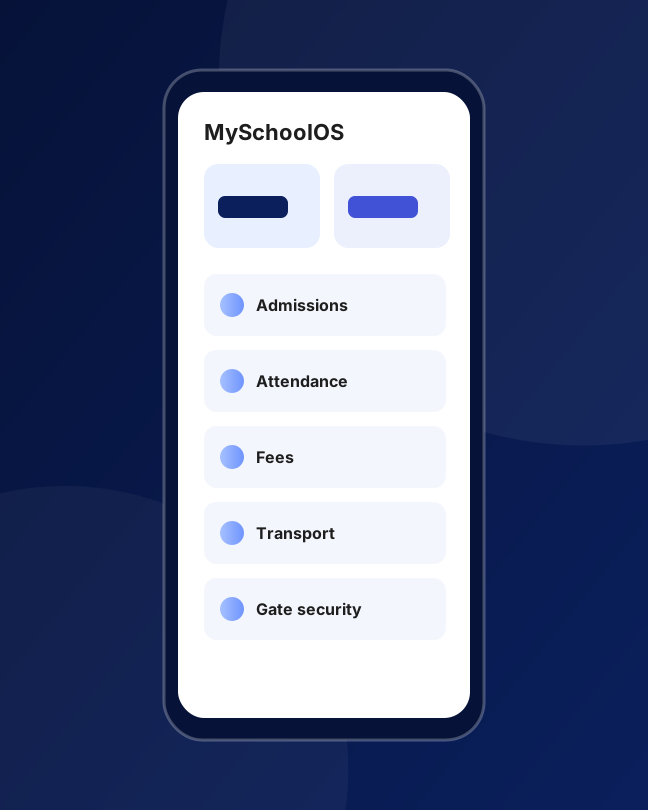
Interoperable
Connects with:

Razorpay, PayU, Stripe, Cashfree

Attendance devices

CSV and Excel

School Network

Google Drive

WhatsApp sharing

Interoperable

Works With Your Gateway, Your Devices and Other Schools

MySchoolOS™ does not trap your data. Parents pay through the gateway account you already hold, common attendance devices connect easily, and spreadsheets move in and out whenever you need them.

Schools on the MySchoolOS™ network can request and send verified student records to each other, only with approval and consent, so a transfer-in takes minutes instead of weeks.

Ask About Integrations Ask About Integrations
Differentiators

What Makes MySchoolOS™ Different

Nine things schools tell us they cannot get from a typical school management system.

AI Assistant

Ask "How much fee did we collect today?" and get an answer. It respects each user's permissions and only proposes changes for a human to confirm.

Risk Center

A traffic-light early-warning view of unpaid fees, falling attendance, weak performance, pending leave, unresolved complaints and expiring transport documents.

True multi-campus

One login, separate campus data, a combined owner view and campus comparison reports.

School Network

Schools on MySchoolOS™ can exchange verified student records and verify each other's certificates, with consent.

QR-verified certificates

Anyone can check a certificate is genuine from a public page.

Live bus tracking with no extra hardware

Drivers share location from their own phone.

Made in India, ready for the world

Designed and built in India, with UPI, cards and net banking via Razorpay, PayU and Cashfree, and international cards via Stripe; SMS and WhatsApp-share workflows; DPDP-aware privacy.

Security by design

Layered security with two-step login, role permissions and audit trails.

Every role has a portal

Admin, teacher, parent, accountant, gateman and transport manager.

Every module

Everything Your School Runs On

One platform, 21 module areas and 171 features. Choose an area to see what it covers.

Admissions and Enquiries

8 features and growing
  • Admission Workflow
  • Admission Document Checklist
  • Custom Student Fields
  • Enquiry Management
  • and more

Student Management

15 features and growing
  • Complete Student Profiles
  • All Students and Search
  • Bulk Student Import
  • Bulk Edit and Bulk Delete (with preview)
  • and more

Academics

11 features and growing
  • Classes, Sections and Subjects
  • Time Table
  • Syllabus
  • Homework
  • and more

Attendance

7 features and growing
  • Student Attendance
  • Attendance Reports and Printing
  • Staff Self Attendance with GPS Geofence
  • Staff Attendance Reports
  • and more

Examinations and Results

9 features and growing
  • Exam Setup
  • Date Sheet
  • Marks Entry
  • Exam Studio
  • and more

Fees and Accounts

13 features and growing
  • Invoices (Session-wise)
  • Class Fee Groups
  • Fee Calculator and Estimates
  • Smart Fee Rules
  • and more

HR, Staff and Payroll

9 features and growing
  • Staff Directory
  • Departments and Designations
  • Salary Components
  • Payroll
  • and more

Transportation

12 features and growing
  • Fleet Records
  • Driver Master
  • Student Transport Allocation
  • Transport Fee Collection
  • and more

Gate and Visitor Security

10 features and growing
  • Gate Management
  • Student Entry and Early Exit
  • Visitor Log with Photo and Pass
  • Staff Entry
  • and more

Security and Access Control

8 features and growing
  • Two-Step Login
  • Role-Based Permissions
  • Admin Permission Delegation
  • Auto Lock Screen
  • and more

Communication

8 features and growing
  • SMS Management
  • Bulk SMS
  • Automatic SMS Alerts
  • Email Notifications
  • and more

Artificial Intelligence

6 features and growing
  • AI Assistant
  • AI Actions with Confirmation
  • How-to Guidance
  • AI Question Paper Generator
  • and more

Risk Center (Early-Warning System)

7 features and growing

A traffic-light view that tells you where to act first. Every card comes with a short Risk Brief on what to do next.

  • Financial Risks
  • Student Attendance Risks
  • Student Performance Risks
  • Staff Risks
  • and more

Multi-Campus Management

7 features and growing
  • Multiple Campuses, One Login
  • Campus Switcher
  • Owner and Campus Admin Roles
  • Campus Comparison Reports
  • and more

School Network

7 features and growing

A secure way for schools on MySchoolOS™ to work together.

  • Student Record Requests
  • Quick Transfer-In
  • Student Passport
  • Certificate Checks
  • and more

Dashboard and Daily Overview

4 features and growing
  • Smart Dashboard
  • Session Financials
  • Today's Circulars
  • Quick Actions

Certificates and Verification

5 features and growing
  • Certificate Manager
  • QR Verification
  • Certificate History
  • Transfer Certificate Check
  • and more

Documents and Files

5 features and growing
  • Document Vault
  • Data Export Center
  • File Manager
  • My Workspace
  • and more

Reports and Analytics

9 features and growing

One hub with search and filters. Reports can be viewed, printed or downloaded.

  • Students
  • Attendance
  • Fees and Finance
  • Staff
  • and more

Website, Branding and Setup

5 features and growing
  • School Website
  • School Branding
  • First-Time Setup Wizard
  • Installable App (PWA)
  • and more

Support, Plans and Growth

6 features and growing
  • User Guide and Help
  • Support Center
  • Subscription and Renewal
  • Flexible Plans
  • and more
Portals for every role

The Right Screen for Every Person

Administrators, teachers, parents, accountants, gate staff and transport managers each get their own login and see only what they need.

Admin / Owner

Full control across every module.

Teacher

  • My Class and class students.
  • Mark attendance and enter marks, limited to assigned classes.
  • Homework, assignments, study material and complaints.
  • Own timetable and schedule.
  • Own salary, leave and agreements.
  • Own attendance with GPS clock-in.
  • Parent fee groups for follow-up.

Parent

  • Dashboard for all their children.
  • Attendance and exam results.
  • Homework, timetable and syllabus.
  • Invoices and online payments.
  • Live bus tracking.
  • Complaints.

Accountant

  • Collect fees and manage invoices.
  • Add and find students and parents.
  • Income, expense and fee calculator.
  • Own attendance and leave.

Gateman

Gate console, visitors, incidents and own attendance.

Transport Manager

Fleet, routes, drivers, fuel, compliance and live map.

Solutions

School ERP for Every Decision-Maker

The same platform, shaped around what each person needs to do every day.

For school owners

See the whole school and every campus in one dashboard. The Risk Center warns you early, the AI Assistant gives instant answers, and you control permissions and protect student data.

For principals

Admission approvals, exam results, attendance trends, staff leave, complaints and certificates in one place.

For accountants

Fast fee collection, receipts, follow-ups, income and expense, payroll and a full audit trail.

For teachers

Take attendance, enter marks, post homework and study material, and see your timetable and salary slips from one login.

For parents

One login to see attendance, marks, homework, bus location and fees, and to pay online.

For school groups

Multi-campus control, campus comparison, shared and campus-specific rules, and School Network transfers.

Comparison

School ERP vs Excel and Paper Registers

Why schools move from spreadsheets and registers to one connected system.

TaskExcel and registersMySchoolOS™™
Fee collectionManual entries, receipts by handOnline payment, payment links, PDF receipts
Dues follow-upMemory and phone callsFollow-up notes, promised dates, reminders
AttendancePaper register, late dataDigital, with parent absence alerts
ReportsHours of manual workInstant reports and analytics
Staff attendanceSigned sheetGPS clock-in and biometric import
CertificatesTyped in Word, hard to verifyOne-click, QR-verified
Multi-campusSeparate files per branchOne login, combined view and comparison
SecurityAnyone with the fileRoles, two-step login, audit trails
Early warningsNoneRisk Center

How to switch

  1. Book a demo
  2. Import your students
  3. Set your fee structure
  4. Train your staff
  5. Go live
Getting started

From First Call to First Login

A guided setup with the data you already have.

STEP : 01

Demo and plan

We show MySchoolOS™ on your own workflow and agree the modules and plan that fit your school.

STEP : 02

Set up

The first-time setup wizard creates your school, classes, sessions, fee structure and branding.

STEP : 03

Import and train

Students and staff come in through bulk import with an error report, and your team is shown how each role works.

STEP : 04

Go live and support

Install the app on phones and desktops, raise tickets from inside the product, and add modules as you grow.

Need Something MySchoolOS™ Does Not Cover?

Fee rules, admission steps, student fields, grading and notification settings are configurable inside MySchoolOS™. For requirements beyond configuration, such as a special integration or a module for your institution, BigExcel™ can develop custom features. See education technology or custom software development.

See It in ActionSee It in Action
Always growing

What's New on This Page

MySchoolOS™ gains new features regularly. This page records when it was last brought up to date, so you and search or AI tools can tell how current it is.
  • Page rebuilt with the full module list (21 areas, 170+ features), the AI assistant with voice and text queries, interoperability details and the official MySchoolOS.com link.
MySchoolOS

The Official MySchoolOS™ Website

See the product, current plans and the latest announcements on its own website.

Go to myschoolos.comGo to myschoolos.com

About MySchoolOS™

MySchoolOS™ is a cloud school ERP made in India for schools across the nation and around the world. It manages admissions, student records, fees, attendance, exams, transport, staff payroll, gate security, communication and reports in one platform, with an AI Assistant and a Risk Center.

A school ERP is software that runs a school's daily operations in one system: admissions, students, fees, attendance, exams, staff, transport and communication. It replaces registers and spreadsheets and gives management accurate, real-time information.

MySchoolOS™ is for schools of every size, in India and abroad, from a single small school to multi-campus groups. It gives school owners, principals, accountants, teachers, gatemen, transport managers and parents their own logins.

Yes. Grading rules, exam components, classes and fee structures are configurable, so the school sets them up to match its own board and pattern.

Yes, it is cloud-based and runs in a web browser. Nothing needs to be installed, and it can be added to a phone or desktop home screen as an app.

Yes. Multi-campus features are optional. A single school simply uses the modules it needs.

MySchoolOS™ combines an AI Assistant, a Risk Center early-warning view, true multi-campus control, School Network record exchange, QR-verified certificates and live bus tracking without extra hardware, in one platform.

Fees and payments

Yes. Parents can pay online through supported gateways (Razorpay, PayU, Cashfree and Stripe), and the school can also send a secure payment link they can open from any phone. The school uses its own gateway account.

UPI, cards and net banking are available through the connected payment gateway, depending on what the school's gateway account has enabled.

Yes. The Smart Fee Rules lets you create rules such as sibling discounts, gender-based concessions and admission-fee settings without any technical work.

Yes. You can record part payments, see payment history, add follow-up notes with promised dates, and send reminders by SMS, email or app notification.

Yes. Invoices and receipts are generated as printable PDFs.

Yes. Invoices are session-wise, and the system checks for duplicates within a session.

AI and Risk Center

It is a chat assistant for school administrators. You ask a question in plain language, such as fee collected today or students with low attendance, and it answers from your school's data.

Yes. Only administrators the owner authorises can use it, and it shows each person only what they are already allowed to see. The owner controls who has access.

No. A person always confirms a proposed change before anything is saved.

You can ask about fee collection and dues, student and staff attendance, exam results and toppers, a student's invoices and missing documents, staff and payroll summary, transport, gate activity and campus comparison. You can also ask how to do a task in MySchoolOS™.

We do not use school data to train AI models. Please see the Privacy Policy for details.

The Risk Center is an early-warning dashboard that shows red, yellow or green status across seven areas: unpaid fees, student attendance, student performance, pending staff leave, high staff leave, unresolved complaints and expiring transport documents.

Each card shows a clear red, yellow or green status with a short Risk Brief on what to check and what to do next.

Attendance, exams, academics

Yes. Automatic absence alerts can be switched on, and the school controls which alerts are sent.

Yes. Staff can clock in and out from their phone within the school boundary, and corrections go to an administrator for approval.

Yes. MySchoolOS™ connects with common fingerprint and face attendance devices. Share your device model and we will confirm the best way to connect it.

Yes. Teachers are limited to their assigned classes for attendance and marks entry unless an administrator gives them wider access.

You create the exam, enter marks subject-wise or student-wise, apply grade and result rules, calculate results and download PDF marksheets. You choose when results are visible to parents.

Yes. Results, marks and exam setups are stored per academic session, so reusing an exam never overwrites earlier years.

Transport and security

The driver opens a simple tracking link on their own phone, and the bus appears on a live map for the school and for parents. No GPS device needs to be bought.

Yes. Compliance Alerts warn you before vehicle and driver documents expire, and the Risk Center flags any already expired.

Yes. You can register visitors with a photo, print a visitor pass, record student early exits, log incidents, blacklist visitors, use kiosk mode and raise a lockdown alert.

Multi-campus and network

Yes. The owner can switch between campuses or view all combined, while each campus keeps its own data and campus admins see only their campus.

Yes. The Campus Comparison report shows students, staff, today's attendance and fee collection and dues for each campus side by side.

School Network lets schools on MySchoolOS™ exchange verified student records and check each other's certificates, with consent.

Each certificate can carry a QR code. Scanning it opens a public page that confirms the certificate is genuine and shows limited details.

Security, privacy, data

Yes. MySchoolOS™ uses layered security: two-step login, role-based permissions, audit trails and separate data for every school and campus.

The school owns its data. MySchoolOS™ processes it on the school's behalf. Schools can export their data from the Export Center.

Our Privacy Policy is written around the Digital Personal Data Protection Act, 2023, with the school as data fiduciary and MySchoolOS™ as processor. Your school should still collect parental consent for minors as required.

You can export your data first. After the subscription ends, data is retained for a set period for export and renewal, then deleted or anonymised, as described in the Privacy Policy.

Setup, support, pricing

Most schools start with their classes, fee structure and staff, then import students in bulk. We guide the setup and train your team.

Yes. Bulk Student Import lets you upload a spreadsheet, review errors before saving and download an error report.

Yes. There is an in-app User Guide, a Support Center for tickets, and onboarding help.

Pricing depends on the modules and the number of students and campuses. Contact us or book a demo for a quote.

Yes. Plans include core modules, and premium modules are added by plan, so you pay for what your school uses.

Yes, you can book a free demo.

Yes. It is fully responsive, and can be installed on your phone like an app.

Parents use the parent portal in a browser or the installable web app. They see attendance, results, homework, invoices and live bus tracking, and can pay fees online.

Yes. Admin, teacher, parent, accountant, gateman and transport manager each have their own portal with only the options they need.

Yes. Schools can invite other schools through Refer and Earn.

